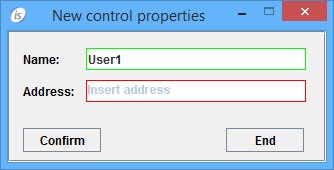
You can use the PLACEHOLDER property to display a hint inside the control when its value is empty. This helps users understand the type of information expected in the input field.
The following example demonstrates how to apply the PLACEHOLDER property to an ENTRY-FIELD:
  03 efname entry-field line 2 col 12 size 30
            placeholder "Insert name"
  03 efaddress entry-field line 4 col 12 size 30
            placeholder "Insert address".
The image shows the final result, with text in the first field and the PLACEHOLDER value in the second, empty, field:
Article ID: 279
Created: September 20, 2016
Last Updated: January 6, 2026
Author: Support KB Author
Online URL: https://support.veryant.com/phpkb/article.php?id=279