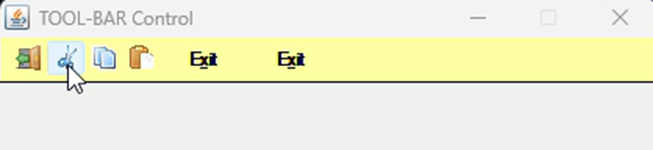
By default, when you put push-buttons on a toolbar they are flat until you hover over them with a mouse. For instance, this toolbar has 4 push-buttons with an icon on them, one push-button with “Exit” and another with the “flat” style. Notice how they are all flat except for the one the mouse is over.
This behavior is the default for the more modern tool-bar class we use (JToolBar). If you want the push-buttons on your tool-bar to be raised they way they used to be, you’ll need to set a variable in your properties file:
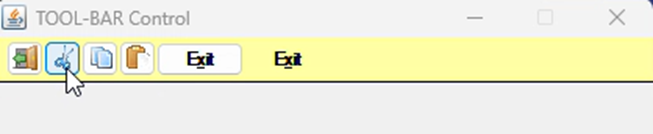
iscobol.gui.tool_bar.native=false
This setting causes the runtime to generate code using the JPanel class. The downside of this setting is that the “Moveable” style isn’t available with the JPanel class. Here is a screenshot showing the buttons with the "iscobol.gui.tool_bar.native" set to false. (Note that the last “Exit” button is still flat, because the “Flat” style was specified for this button.)
Attached is a sample program.
Compile with iscc:
iscc bmp-flat-toolbar.cbl
To see the default behavior of the tool-bar buttons, run as:
iscrun BMP_FLAT_TOOLBAR
To see the legacy behavior, run as:
iscrun -c run.properties BMP_FLAT_TOOLBAR
Article ID: 358
Created: May 13, 2026
Last Updated: May 13, 2026
Author: Support KB Author
Online URL: https://support.veryant.com/phpkb/article.php?id=358